JavaScript Modules Explained
Why Do We Even Need Modules?
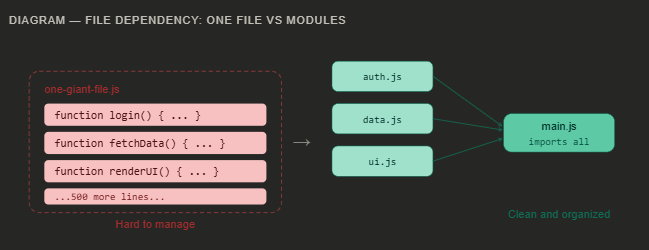
Imagine you are writing a story, and you put every single sentence — every chapter, every character, every note to yourself — in one giant paragraph with no breaks. That would be a nightmare to read or edit, right?
Early JavaScript worked the same way. Developers would write thousands of lines of code all in a single file. Every variable and function lived in the same space. If you named a variable total in one place, and someone else named theirs total too, one of them would silently overwrite the other. Bugs would appear out of nowhere and be nearly impossible to trace.
Real problem, real pain: In large projects without modules, a single misnamed variable or a function defined twice could crash the entire app — and finding it felt like looking for a needle in a haystack.
Modules solve this by letting you split your code into separate files, each with its own private space. They only share what they choose to share. It is like giving each chapter of your story its own notebook.
Exporting — Sharing What You Want
A module file keeps everything private by default. To let other files use something, you have to export it. Think of it as publishing specific things from your notebook while keeping your rough notes private.
export function add(a, b) {
  return a + b;
}

// This stays private — only used inside this file
function secretHelper() {
  // no one outside can call this
}
You can also export a value or variable, not just functions:
export const API_URL = "https://api.example.com";
export const MAX_RETRIES = 3;
Key idea: export is your way of saying "this is public — other files are welcome to use this."
Importing — Using Other Modules
Once something is exported, another file can bring it in using import. You specify exactly what you want, like picking items off a menu.
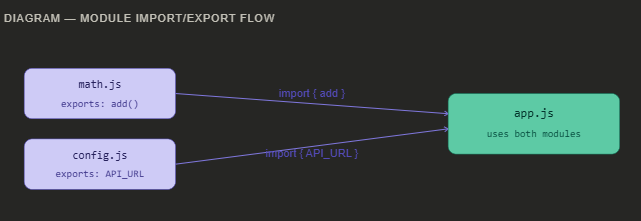
import { add } from "./math.js";
import { API_URL, MAX_RETRIES } from "./config.js";

console.log(add(2, 3)); // 5
console.log(API_URL); // "https://api.example.com"
Default vs Named Exports
There are two styles of exports. Understanding the difference will save you a lot of confusion.
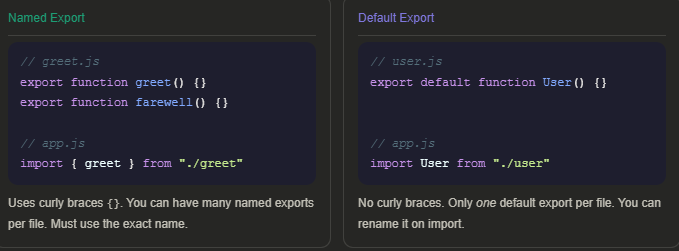
Simple rule to remember: Use named exports when a file has multiple things to share. Use a default export when the file has one main purpose — like a React component or a class.
Benefits of Modular Code
Why go through all this effort? Because modular code pays off enormously as your project grows.
Organization
Each file has one job. Easy to find what you need.
Reusability
Write a function once, import it anywhere.
Testability
Test each module in isolation, no side effects.
Teamwork
Multiple developers work on different files safely.
Encapsulation
Private logic stays private — no accidental conflicts
Think of it this way: if your app were a car, modules are the separate parts — engine, brakes, lights. Each does its job independently. If the lights break, you fix just the lights, not the whole car.
Quick recap: Modules help you split code into files. You export what you want to share, and import what you need. Named exports use {} and can be many; default exports are one per file. The result? Code that's organized, reusable, and much easier to maintain.