Map and Set in JavaScript
JavaScript has always had objects and arrays for storing data. But as you write more complex programs, you'll run into situations where objects and arrays feel clunky or limited. That's exactly why JavaScript introduced two powerful alternatives: Map and Set.
In this article, we'll understand what problems they solve, how they work, and when to use them over regular objects and arrays.
What is a Map?
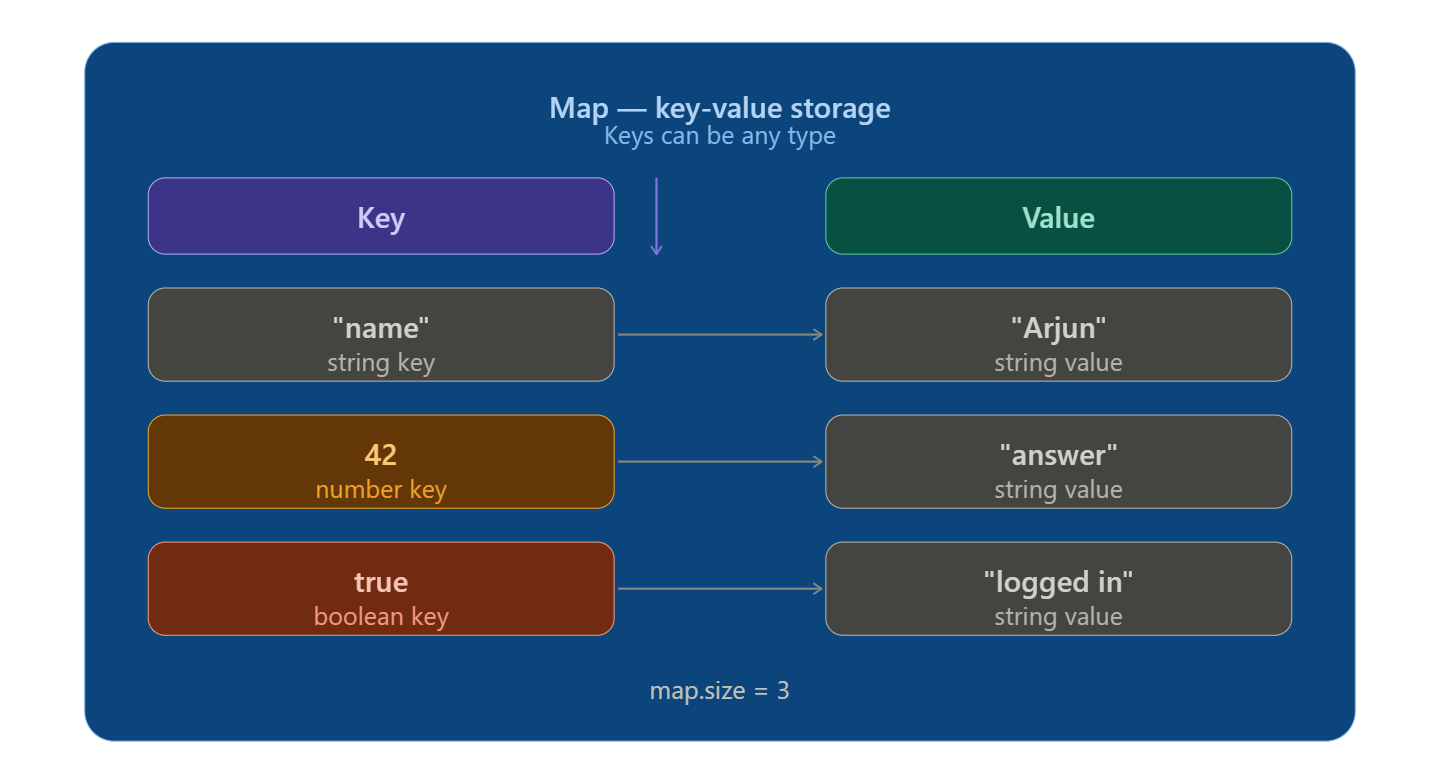
A Map is a collection of key-value pairs — just like an object. The big difference? In a Map, keys can be anything — strings, numbers, booleans, even other objects.
const userMap = new Map();

userMap.set("name", "Arjun");
userMap.set("age", 22);
userMap.set(true, "logged in");

console.log(userMap.get("name")); // "Arjun"
console.log(userMap.get(true));   // "logged in"
console.log(userMap.size);        // 3
Notice: you use .set() to add and .get() to retrieve. A Map remembers the insertion order of its entries and has a .size property built in.
What is a Set?
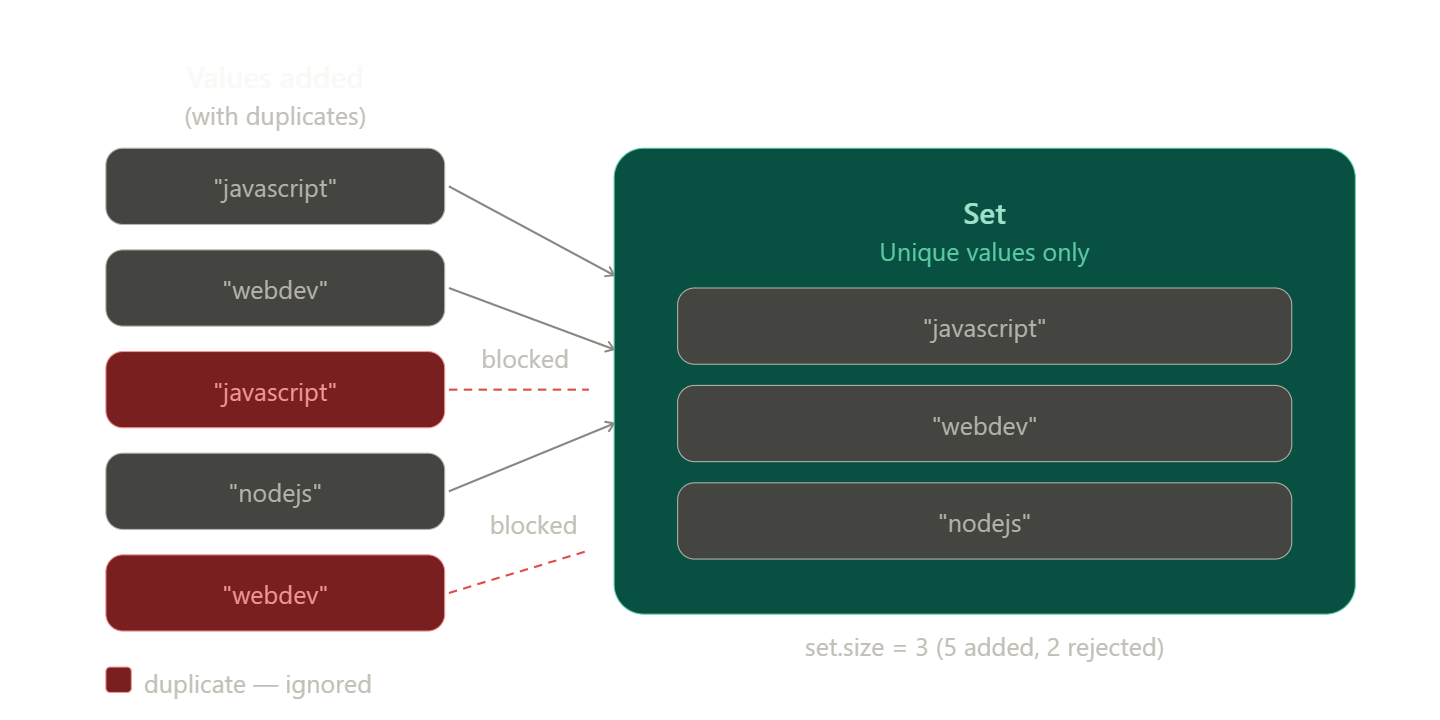
A Set is a collection of unique values — it automatically removes duplicates. No two identical values can exist inside a Set.
const tags = new Set();

tags.add("javascript");
tags.add("webdev");
tags.add("javascript"); // duplicate — silently ignored

console.log(tags);      // Set { "javascript", "webdev" }
console.log(tags.size); // 2
You use .add() to insert values, and duplicates are simply thrown away. This makes Set perfect for any situation where you need a list without repetition.
Map vs Object — What's the Difference?
Objects seem to do the same thing as Maps. So why use Map at all?
Here's the problem with plain objects:
const obj = {};

// Problem 1: keys are always converted to strings
obj[1] = "one";
console.log(Object.keys(obj)); // ["1"] — not a number anymore!

// Problem 2: no .size property
console.log(obj.length); // undefined

// Problem 3: prototype keys can accidentally clash
console.log(obj.toString); // exists even though you never set it!
Map solves all of these:
| Feature | Object | Map |
|---|---|---|
| Key types | Strings & Symbols only | Any type |
| Key order | Not guaranteed | Always insertion order |
| Size | Manual count | .size property |
| Iteration | Needs Object.keys() |
Built-in .forEach() / for...of |
| Default keys | Has prototype keys | Completely empty |
const map = new Map();
map.set(1, "one");       // number key
map.set(true, "yes");    // boolean key
map.set({id: 1}, "user"); // object as key!

console.log(map.size);   // 3 — works!
Set vs Array — What's the Difference?
Arrays allow duplicates. That's fine most of the time, but sometimes duplicates are a bug, not a feature.
// The problem with arrays
const likes = ["cats", "dogs", "cats", "fish", "dogs"];
console.log(likes.length); // 5 — duplicates counted

// The Set solution
const uniqueLikes = new Set(likes);
console.log(uniqueLikes); // Set { "cats", "dogs", "fish" }
console.log(uniqueLikes.size); // 3
// Array — has to scan from start to end (slow for large data)
likes.includes("cats"); // true

// Set — instant lookup (no scanning needed)
uniqueLikes.has("cats"); // true
| Feature | Array | Set |
|---|---|---|
| Duplicates | Allowed | Not allowed |
| Value lookup | .includes() — slow |
.has() — fast |
| Index access | arr[0] |
Not possible |
| Order | Preserved | Preserved |
| Use case | Ordered lists | Unique collections |
When to Use Map and Set
Use Map when:
Your keys aren't strings (numbers, booleans, objects)
You need to frequently add/remove key-value pairs
You need to know the count quickly with
.sizeYou're iterating over key-value pairs often
// Counting word frequency — perfect Map use case
const text = "the cat sat on the mat the cat";
const wordCount = new Map();

text.split(" ").forEach(word => {
  wordCount.set(word, (wordCount.get(word) || 0) + 1);
});

console.log(wordCount.get("the")); // 3
console.log(wordCount.get("cat")); // 2
Use Set when:
You need a list with no duplicates
You want to quickly check if a value already exists
You're filtering unique values from an array
// Remove duplicates from an array — one-liner with Set
const scores = [90, 85, 90, 72, 85, 100];
const uniqueScores = [...new Set(scores)];

console.log(uniqueScores); // [90, 85, 72, 100]
// Track which users have visited a page
const visited = new Set();

function visit(userId) {
  if (visited.has(userId)) {
    console.log("Already visited");
  } else {
    visited.add(userId);
    console.log("New visitor!");
  }
}

visit("u001"); // New visitor!
visit("u002"); // New visitor!
visit("u001"); // Already visited
Quick Summary
Mapstores key-value pairs where keys can be any type — use it instead of objects when you need flexibility and reliabilitySetstores unique values only — use it instead of arrays when duplicates are a problemBoth
MapandSethave a.sizeproperty, preserve insertion order, and are easy to iterate
Conclusion
Map and Set aren't just fancy alternatives to objects and arrays — they solve real problems that beginners run into all the time: duplicate data, non-string keys, and slow lookups. Once you know they exist, you'll find yourself reaching for them more often than you expect!
Try them out in your console — start by converting a regular array to a Set and see how duplicates vanish instantly.
First — Map as a key-value storage visual:
Second — Set uniqueness: what happens when duplicates try to sneak in: