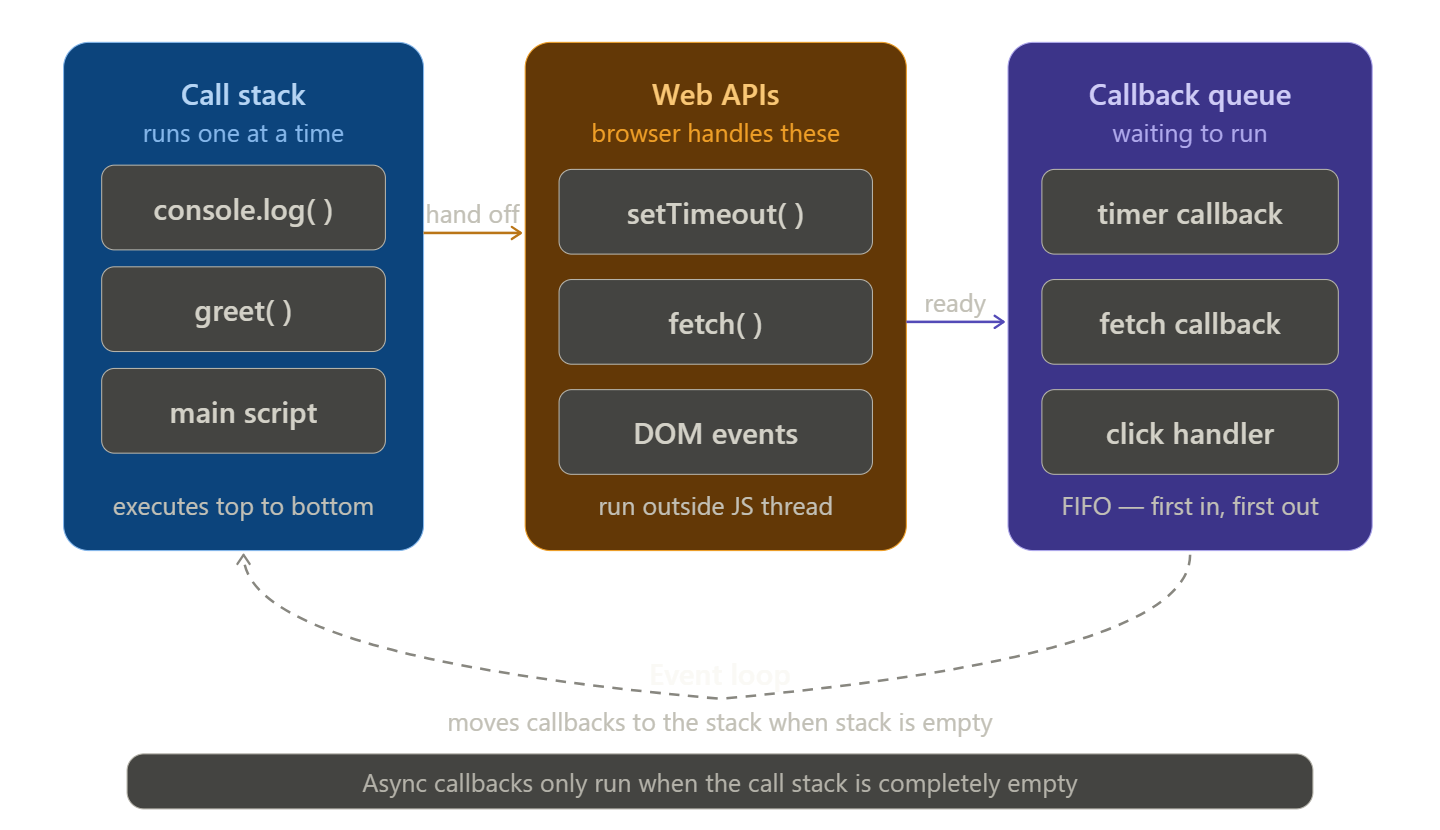
Synchronous vs Asynchronous JavaScript
Imagine you're at a chai stall. You walk up, order, and the vendor makes you stand there and wait nobody else gets served until your chai is ready. That's synchronous. Now imagine a restaurant where you place your order, sit down, and the waiter serves other tables while your food is being prepared. That's asynchronous.
JavaScript works the same way. Understanding the difference between synchronous and asynchronous code is one of the most important concepts in web development and once it clicks, a huge part of JavaScript suddenly makes sense
What is Synchronous Code?
Synchronous code runs line by line, in order. Each line must finish completely before the next one starts. JavaScript reads your code top to bottom, and nothing jumps ahead.
console.log("Step 1: Boil water");
console.log("Step 2: Add tea leaves");
console.log("Step 3: Pour in cup");

// Output (always in this order):
// Step 1: Boil water
// Step 2: Add tea leaves
// Step 3: Pour in cup
Simple and predictable. Line 1 finishes → Line 2 starts → Line 3 starts. No surprises.
Here's a slightly more real example:
function greet(name) {
  return "Hello, " + name + "!";
}

const message = greet("Arjun");
console.log(message);
console.log("Done");

// Output:
// Hello, Arjun!
// Done
JavaScript calls greet(), waits for it to return, stores the result, then moves on. Everything is sequential
What is Asynchronous Code?
Asynchronous code does not wait. It starts a task, moves on to the next line immediately, and comes back to handle the result when it's ready.
console.log("Start");

setTimeout(function() {
  console.log("Inside timer — runs after 2 seconds");
}, 2000);

console.log("End");

// Output:
// Start
// End
// Inside timer — runs after 2 seconds
Wait — "End" printed before the timer? Yes. That's the core idea.
setTimeout doesn't block JavaScript. It says: "start a 2-second countdown, but keep running the rest of the code. When 2 seconds are up, come back and run this function." So JavaScript prints "Start", starts the timer, prints "End", and then — once the timer fires — prints the inside message.
This is asynchronous behaviour in action
Why Does JavaScript Need Asynchronous Behaviour?
JavaScript is single-threaded — it can only do one thing at a time. There is no parallel execution. This is by design.
Now think about what a web page does all day: it fetches data from servers, reads files, waits for user input, loads images. All of these operations take time — sometimes milliseconds, sometimes seconds.
If JavaScript were forced to wait (synchronously) for every network request before doing anything else, your entire webpage would freeze every time you loaded data. The user couldn't click anything. The page would be completely unresponsive.
Asynchronous code solves this. Instead of freezing and waiting, JavaScript says: "I'll start this task and get a notification when it's done — in the meantime, let me keep the page responsive."
Real-World Examples
Example 1 — setTimeout (timer)
console.log("Checking order status...");

setTimeout(() => {
  console.log("Order confirmed!");
}, 3000); // Waits 3 seconds

console.log("Waiting for response...");

// Output:
// Checking order status...
// Waiting for response...
// Order confirmed!       ← arrives 3 seconds later
Example 2 — fetch (API call)
This is the most common real-world async operation. Fetching data from a server takes time you don't know how long
console.log("Fetching user data...");

fetch("https://api.example.com/users/1")
  .then(response => response.json())
  .then(data => {
    console.log("User received:", data.name);
  });

console.log("Waiting...");

// Output:
// Fetching user data...
// Waiting...
// User received: Arjun    ← arrives when server responds
The page doesn't freeze while waiting for the server. JavaScript keeps running, and handles the data when it arrives.
Example 3 — setInterval (repeated timer)
let count = 0;

const timer = setInterval(() => {
  count++;
  console.log(`Ping ${count}`);

  if (count === 3) {
    clearInterval(timer); // stop after 3
  }
}, 1000);

console.log("Timer started");

// Output:
// Timer started
// Ping 1     ← after 1 second
// Ping 2     ← after 2 seconds
// Ping 3     ← after 3 seconds
Problems with Blocking Code
"Blocking" means a piece of code that freezes JavaScript until it's done — nothing else can run. In a browser, this means the entire page becomes unresponsive.
Here's a contrived but clear example of blocking behaviour:
// Simulate a slow synchronous operation
function slowTask() {
  const start = Date.now();
  while (Date.now() - start < 3000) {
    // Doing nothing but hogging the thread for 3 seconds
  }
  return "Done!";
}

console.log("Starting slow task...");
const result = slowTask(); // FREEZES here for 3 full seconds
console.log(result);
console.log("Moving on...");
During those 3 seconds, the user can't click a button, scroll the page, or interact with anything. The browser is stuck.
This is exactly why you must never do slow work synchronously in JavaScript — and why async patterns like callbacks, Promises, and async/await exist.
The classic mistake beginners make:
// WRONG: trying to use data before it arrives
let userData;

fetch("https://api.example.com/users/1")
  .then(res => res.json())
  .then(data => {
    userData = data; // ← data arrives here, asynchronously
  });

console.log(userData); // undefined — data hasn't arrived yet!
The fetch hasn't finished when console.log runs. You can't use async data synchronously. This is the single most common beginner mistake with JavaScript.
The fix is to always work inside the async callback:
// CORRECT: use the data where it arrives
fetch("https://api.example.com/users/1")
  .then(res => res.json())
  .then(data => {
    console.log(data); // works — you're inside the async handler
  });
Quick Summary
| Synchronous | Asynchronous | |
|---|---|---|
| Execution | Line by line, in order | Starts task, moves on immediately |
| Blocking | Yes — waits for each step | No — keeps running other code |
| Use case | Simple logic, calculations | API calls, timers, file reads |
| Risk | Freezing the page | Using data before it arrives |
Synchronous code is predictable but can freeze the browser if any step is slow
Asynchronous code keeps the page responsive by not waiting
JavaScript is single-threaded, so async behaviour is essential for anything that takes time
Always work with async data inside the callback — never try to use it synchronously right after
Conclusion
Synchronous and asynchronous are not just JavaScript concepts — they're a mental model for how modern applications handle time. Once you understand that some things take time and JavaScript won't wait for them automatically, everything else — Promises, async/await, callbacks — becomes much easier to learn.
First the synchronous execution timeline, showing how each step blocks the next:
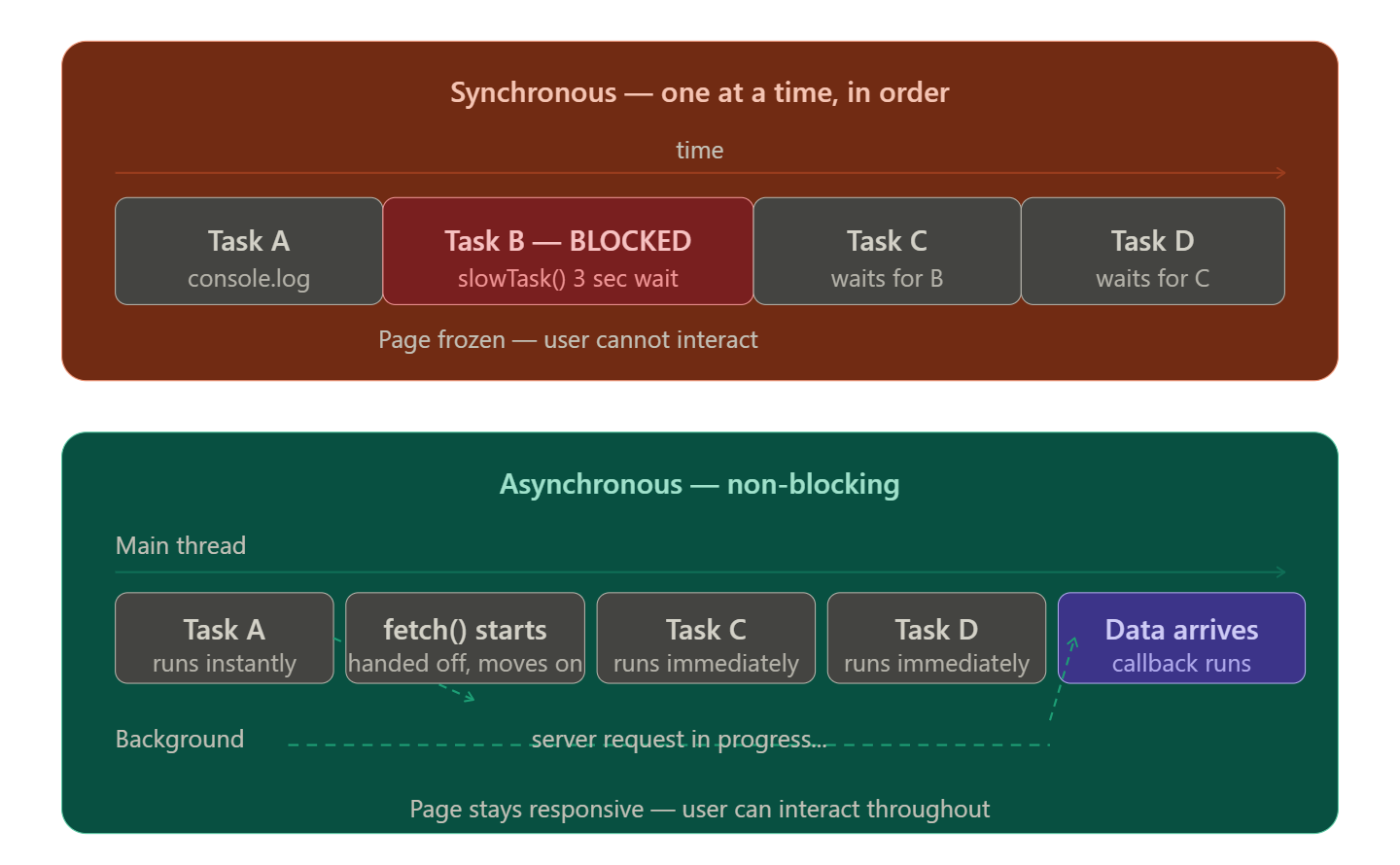
Second the async task queue: how JavaScript juggles tasks without freezing: